Networking Basics — HTTP, TCP/IP
How data actually travels across the internet - Simplified

Story Time
Imagine you want to send a letter from Chennai to your friend in Delhi. You write the message, put it in an envelope, write their address, and hand it over to a courier service.
Now think about what needs to happen for this to work. The courier must know where to deliver, i.e., address, the system must ensure the letter reaches safely, i.e., safe delivery process and the letter itself must be understandable, i.e., formatted message body.
If anything goes wrong the message doesn't reach the target or worse the message gets misinterpreted. This exact problem exists in computers as well.
When your laptop talks to a server somewhere in the world, it also needs a way to identify machines, send data reliably and to structure the message. This is where IP, TCP, and HTTP come in.
Now mapping the analogy examples to the communication across internet, me can roughly translate the physical address of the recipient to IP Address, the courier service to TCP and content of the letter to HTTP request body.
Here is an easy way to remember this. Whenever you open a website, HTTP represents what you say, TCP represents delivery safety and IP represents where it's delivered to.
What is a Network?
Now lets think about it from a real life scenario where networking generally means you going and speaking with a lot of people who you feel may help yourself or your business in the future. This network may include bankers, doctors, engineers etc.
Computers also follow the same logic. A network is just a group of connected devices including your laptop, phone, routers, servers, etc. These devices communicate using agreed rules.
And a massive network of smaller networks connected together is called Internet.
What Does It Mean for Computers to Communicate?
Communication between humans are complicated, we have nuances, hidden agendas and other things that needs to be understood. I don't even want to go into that..
At its core, computers are purpose oriented and communication between computers are simple. One machine sends data to another machine which receives it and sends back a response confirmation.
But the complexity comes from a different aspect. The network contains millions of devices (so you can imagine the complexity in finding your target), unreliable networks and data breaking into pieces during travel (Will explain this as a separate section).
What does “data breaks into pieces during travel” mean?
When we say “data breaks into pieces during travel”, we’re describing how large data is split into smaller chunks (called packets) before being sent over a network.
Consider sending a 500-page book to a friend. Instead of shipping it as one large package, you divide it into smaller parcels, each containing 50 pages. While this might initially seem unnecessary, it becomes practical when considering ease of transport and speed. Smaller packets are easier to handle, and if one is lost, only that specific part needs to be resent. This approach becomes even more logical when scaling up to send fifty thousand 500-page books.
Now mapping this to networking, when your browser sends or receives data across the network (like an HTTP request or a large response), it doesn't send everything as one big chunk. Instead, the data is split into small units called data packets.
What Does a “Packet” Look Like (Conceptually)?
Each packet contains a piece of the actual data, a sequence number (its position or index), the destination IP address and some control information.
Why Do We Break Data Like This?
Network Limitations - Networks have a limit called MTU (Maximum Transmission Unit). You literally cannot send unlimited-size data in one go.
Reliability - If you send one big chunk and it fails for some reason you will need to resend everything. But, if you send packets of smaller size and one or more of the packets failed, you resend only the missing packet/packets.
Different Routes - Packets don’t always take the same path to reach the destination, very similar to how amazon packages gets shipped via different routes but reach your home destination.
Packet 1 → Route A
Packet 2 → Route B
Packet 3 → Route C
This is exactly where TCP becomes critical.
What Does TCP Do?
Once data is split into data packets, some very obvious problems arise, for instance, since packets gets routed via different routes, as some packets arrive earlier than other and not necessarily in correct order.
Sometimes the packets arrive so late that the it would be considered as not sent and as we discussed before it gets resent. But the original one was just delayed not failed which results in the same packets getting sent twice or more depending on number of retries.
TCP handles all of this chaos. It reorders packets correctly, detects missing packets and requests retransmission and removes duplicate packets (based on index, received timestamp, etc.). So at the receiving end we get the original complete message, perfectly reconstructed
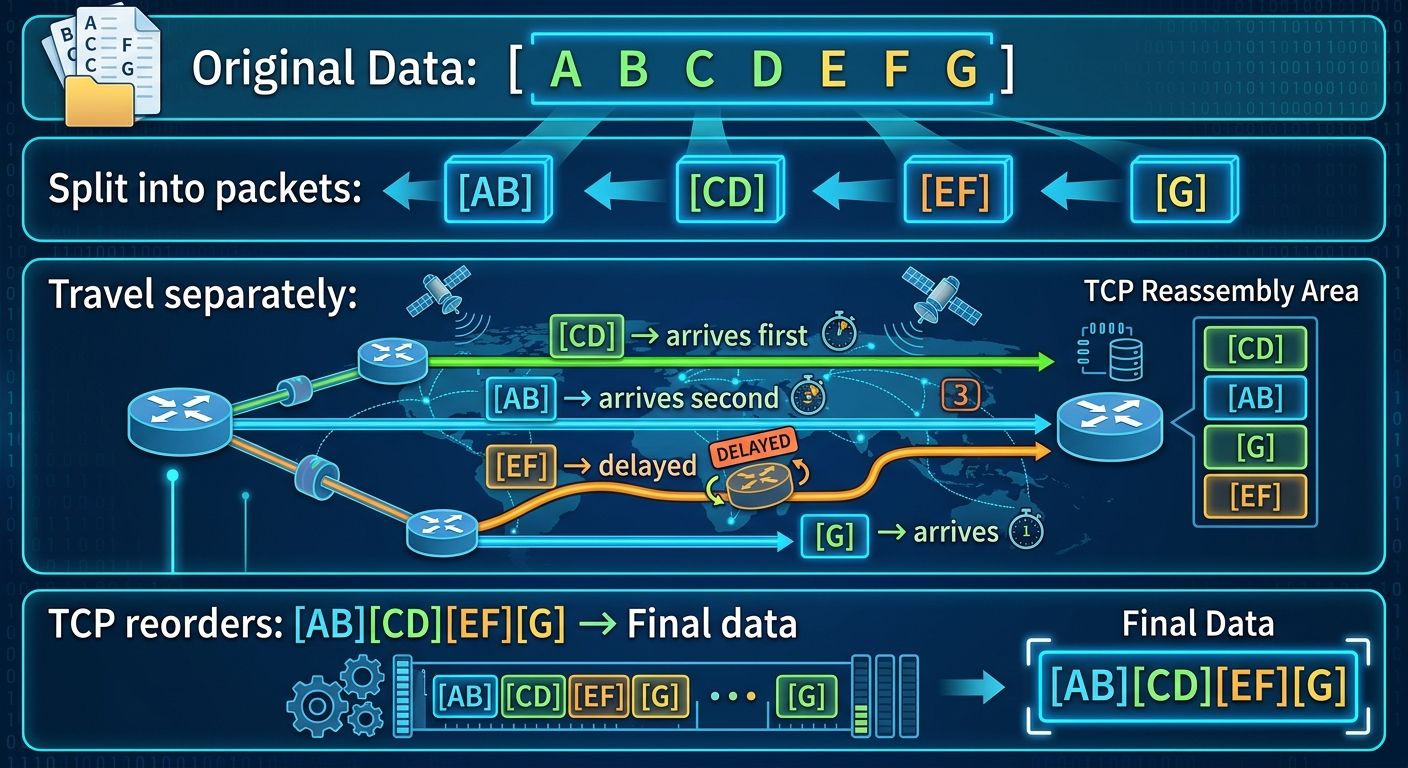
When you watch a YouTube video or load Instagram or download a file/app, data is continuously split into packets, sent across the network and reassembled at your phone or laptop.
Without TCP your data would be unreliable and messy
Role of HTTP
Now we come to HTTP (Hypertext Transfer Protocol) the last component of interest for this blog. This is the actual language used between client and server. It defines what a request looks like and what a response looks like.
As I had mentioned above, the communication between computers are simple and purpose oriented. Because of the nature and intent of this communication the requests and responses are structured, and this structure is mutually agreed between the client and server. Any deviation from this would be considered a violation of the agreement made between them.
Stateless Nature of HTTP
HTTP is stateless. Now, I know that's just more jargon, and I promised to avoid it. However, some terms are unavoidable, so please bear with me.
What that means is each request is independent, i.e., server doesn't remember who you are or what action you did before. That’s why we use cookies, sessions and Tokens (JWT), to help “simulate memory” on top of HTTP.
Now combining everything
HTTP creates the message
TCP breaks it into packets and ensures delivery
IP sends those packets to the correct machine
What Happens When You Open a Website?
Let’s walk through this clearly with a step by step breakup of what happens under the hood. When you type https://example.com
Step 1: Browser asks DNS: “What is the IP of example.com?” and gets IP like
192.168.1.10(DNS is explained in a different blog under the same series).Step 2: Browser establishes a TCP connection with the server.
Step 3: HTTP creates the message/request to be sent to the destination address.
Step 4: Request get's broken into packets by TCP
Step 5: Request is sent using IP across networks to the destination address.
Step 6: Server receives the message as scrambled data packets.
Step 7: TCP clean up duplicates and reassembles packets
Step 8 : HTTP reads and understands the request and send out a response.
Step 9: Response travels back, again split → transmitted → reassembled.
Step 10: Browser renders the message into HTML to be viewed in a webpage.
Common Mistakes Developers Make
Mixing up roles - Thinking HTTP handles delivery, it doesn’t. Its done by TCP/IP.
Ignoring TCP importance - Reliability is not automatic TCP provides it.
Assuming server remembers everything - HTTP is stateless by default and we use additional properties in our request to mimic remembrance.
To Finally Summarize
IP identifies where to send data, TCP ensures reliable delivery and HTTP defines what the message is. HTTP runs on top of TCP/IP and every website you open follows this exact flow
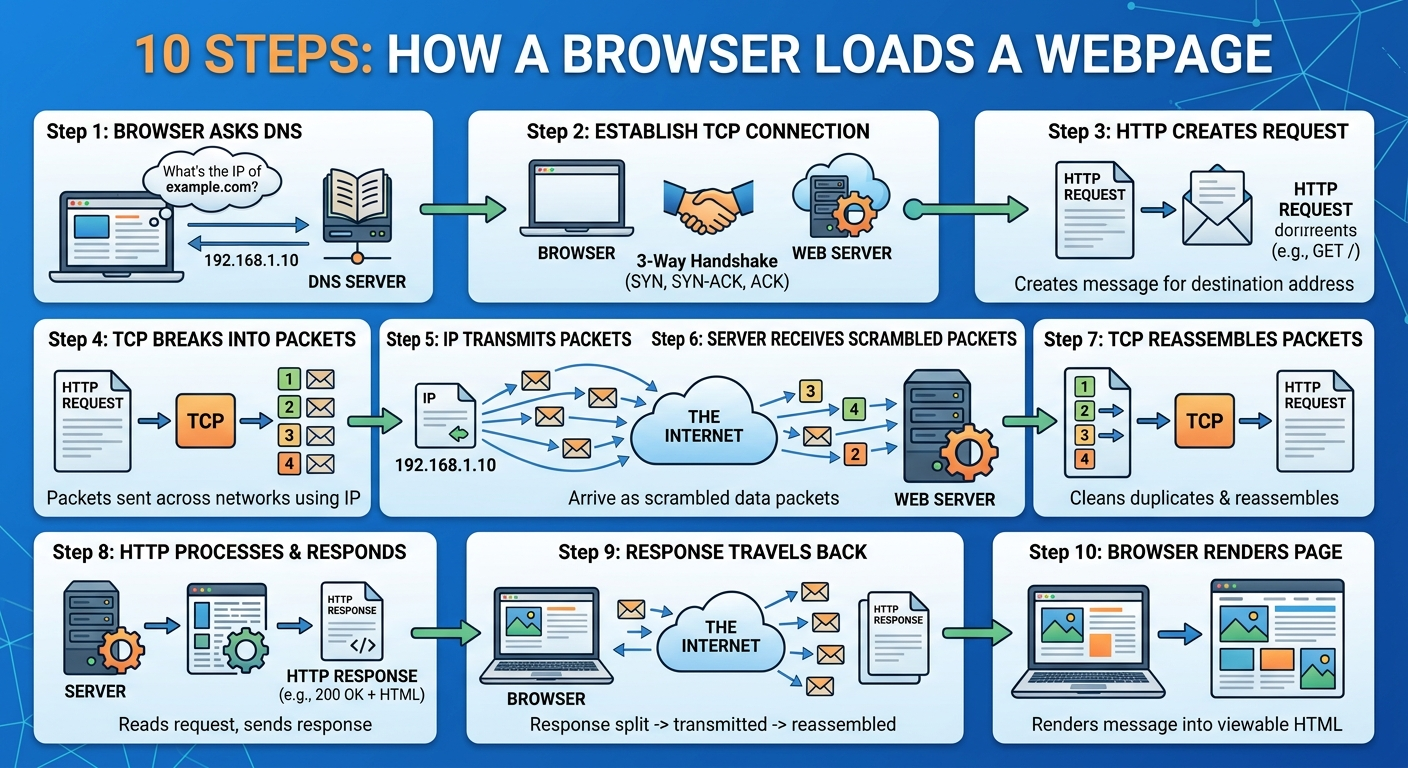
If you understand this flow clearly, you’ve already unlocked 70% of what most developers struggle with in networking interviews.
The rest is just deeper layers of the same idea.
- #networkingbasics
- #http-explained
- #tcpip-explained
- #how-internet-works
- #backend-fundamentals
- #computer-networks
- #http
- #http-request-and-response
- #tcp-vs-ip
- #webfundamentals
- #system-design-basics
- #beginner-networking
- #software-engineering-basics
- #api-fundamentals
- #client-server-architecture
- #full-stack-fundamentals
About the author
- Senior Software Engineer with 7+ years in Java, Spring Boot, and scalable backend systems. I help engineers crack backend/full-stack interviews, improve system design, and transition into cloud and AI with practical, real-world guidance.
Comments
Join the discussionNo comments yet. Be the first to comment.


