What is CSP (Content Security Policy)?
Why your browser suddenly blocks “perfectly fine” scripts

Story Time
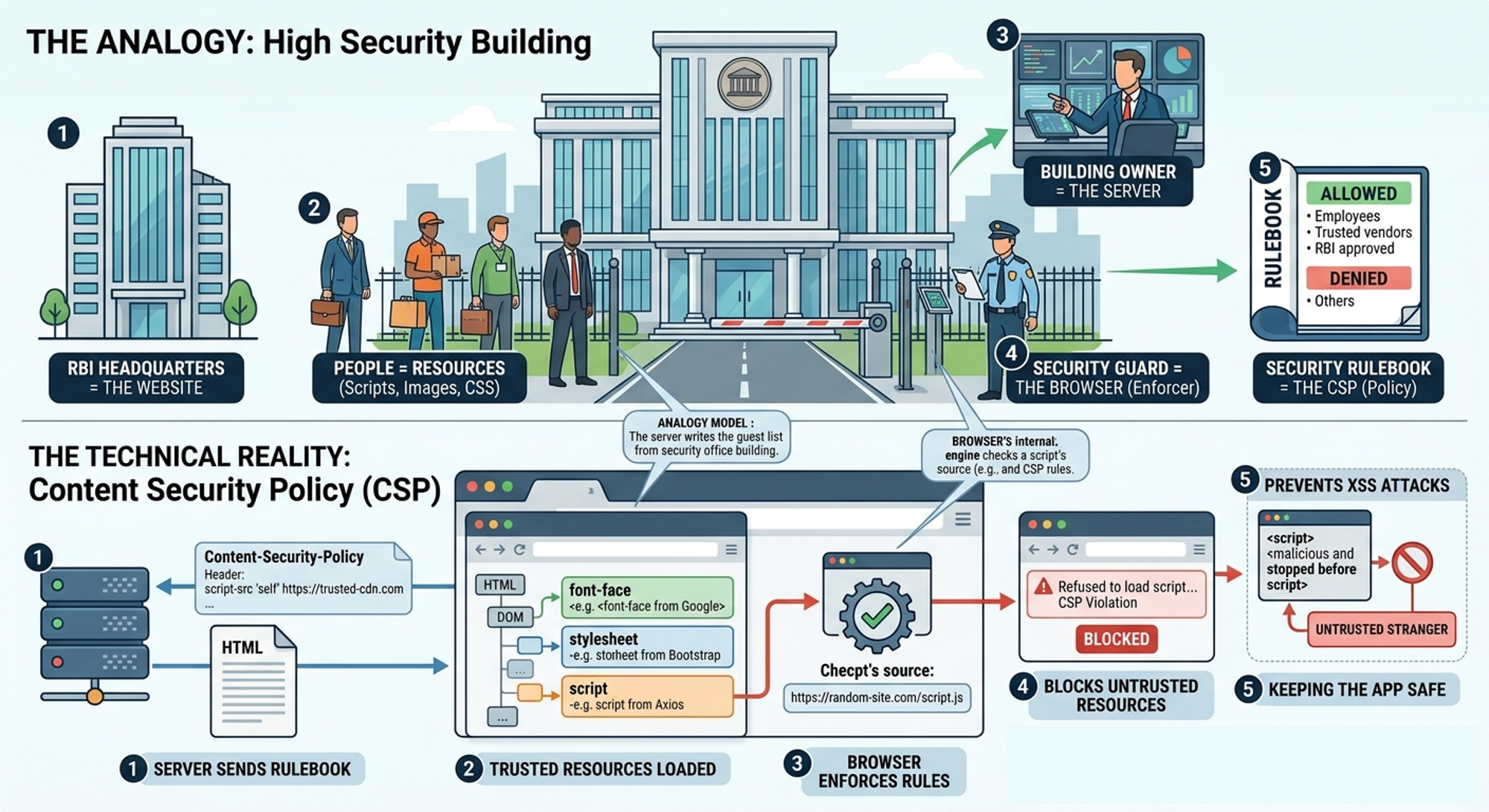
Imagine you’re managing a high security office building, for example, Reserve Bank of India (RBI) Headquarters. Every day, different type of people try to enter this building including employees, delivery agents, visitors and/or random strangers.
Now, you manage the security and don’t want just anyone walking in. So what do you do? You create a rulebook for the security guard at the entrance, something like only employees who work there, deliveries from trusted vendors and a select few personnel approved by RBI are allowed. Everyone else should be denied entry.
Now here’s the important part the owner (you) of the security firm defines the rules and the security guard enforces them.
Let’s translate this to how websites work. From our analogy above:
The building we are securing translates to the website.
The people entering are the resources that are loaded to make your frontend work (scripts, images, CSS, etc.)
The owner who sets the rules in the web world would be the server.
The security who enforces the rules the owner creates is the browser.
The rulebook that the owner/server creates is the CSP (Content Security Policy)
Why Do We Even Need This?
Websites don’t just load their own code. They often load scripts from CDNs, fonts from Google and/or images from external sources, Something like the code snippet below :
<!DOCTYPE html>
<html lang="en">
<head>
  <!-- Font from Google Fonts -->
  <link href="https://fonts.googleapis.com/css2?family=Roboto&display=swap" rel="stylesheet">

  <!-- CSS from a CDN -->
  <link rel="stylesheet" href="https://cdn.jsdelivr.net/npm/bootstrap@5.3.0/dist/css/bootstrap.min.css">
</head>
<!-- Usage of the fonts from Google Fonts -->
<body style="font-family: 'Roboto', sans-serif;">
  <!-- Usage of the text-primary style from the bootstrap CSS -->
  <h1 class="text-primary">Hello CSP 👋</h1>

  <!-- Image from external source -->
  <img src="https://images.unsplash.com/photo-1506744038136-46273834b3fb" alt="Nature" width="300">

  <!-- Script from a CDN -->
  <script src="https://cdn.jsdelivr.net/npm/axios/dist/axios.min.js"></script>
</body>
</html>
Now imagine this, a malicious script sneaks in from an untrusted source and runs inside your website. that script can steal user data or hijack sessions or modify your UI. This type of attack is commonly known as Cross-Site Scripting (XSS).
You don’t need to go deep into security theory to understand this. Just remember if a browser runs a bad script, your entire application is compromised.
Enter CSP: The Rulebook
As mentioned in our analogy above, Content Security Policy (CSP) is simply a set of rules defined by the server that tells the browser “Only load resources from these trusted places.”
That’s it, nothing magical. The server sends the rulebook along with the response, the browser reads it and acts like a strict security guard.
Let's look at this with a simple example. Let’s say your website defines a CSP like this
Content-Security-Policy: script-src 'self' https://trusted-cdn.com;
Here the server is telling the browser to only allow scripts from your own website (self) and from trusted-cdn.com. Everything else should be blocked.
What Happens When Something Gets Blocked?
Let’s walk through a real scenario. Your frontend tries to load a script, something like this :
<script src="https://random-site.com/script.js"></script>
But based on the your CSP above, it does not allow to load scripts from this source as random-site.com is not in the allowed list. So the browser blocks the request, ensuring that the script never runs and keeping your app safe.
When this happens, you’ll usually see an error in the browser console like:
Refused to load the script because it violates the Content Security Policy
This is the browser saying, “I blocked this because it’s not in the rulebook.”
Real-World Example
Let’s say your frontend uses React app hosted on your domain, a CDN for libraries and Google Fonts for fonts. Imagine your CSP is allowing your own domain, specific CDNs and a few font providers. Now Imagine if someone injects a script like this in your HTML
<script src="https://evil-site.com/hack.js"></script>
Even if that script is now present in the HTML, the browser will refuse to execute it. That’s the power of CSP.
Many developers think “If the script is in my HTML, it will run.”. This is not true. With CSP, just the presence of the script doesn't necessarily grant permission for it to run. The browser always checks the rulebook first.
Final Thought
CSP is a set of rules defined by the server and the browser enforces these rules strictly. It prevents untrusted resources from loading and helps protect against attacks like XSS. If a resource is not allowed, it gets blocked immediately.
Very important thing to remember is that CSP is not about restricting your app. It’s about controlling who you trust inside your system.
Because in the web world one bad script is enough to break everything.
About the author
- Senior Software Engineer with 7+ years in Java, Spring Boot, and scalable backend systems. I help engineers crack backend/full-stack interviews, improve system design, and transition into cloud and AI with practical, real-world guidance.
Comments
Join the discussionNo comments yet. Be the first to comment.
The Real - Real Basics
If you’ve ever felt like tech concepts are explained *just one layer too high*, this series is for you. **“The Real – Real Basics”** is not about definitions. It’s about **understanding what’s actually happening underneath**. Most resources jump straight into something like “This is a process”, “This is a thread” and “This is memory” But they rarely answer basic doubts like *Why do these things even exist?*, *What problem are they solving?*, *What is the computer actually doing behind the scenes?* which may arise in everyone's mind. --- ## What you’ll learn This track covers the foundations every developer *uses daily* but often doesn’t fully understand the very basic of the basics starting from *What is a Computer (beyond keyboard + screen)* to *How everything connects in real systems* --- ## Who this is for This is a supplement for *Beginners* trying to build strong fundamentals, *Developers* preparing for interviews, *Engineers* who “use things” but want to "understand them deeply" Also just to clarify these are individual blogs that can help you understand what you have already been using or would be using in you current/new role. This is not a guided course. --- ## What to expect I plan to write these blogs in a simple easy to understand language that can help connect the "layman" in us to the "coder" in us. I'll try my level best to make the blogs be with story-driven explanations, clear mental models, real backend/system relevance and no unnecessary jargon (which is very hard to do, so when I use something and any clarity is required on those, Ill try to include what that means in the blog itself and if I miss anything please let me know in comments). --- ## End goal By the end of this series, you won’t just *know* concepts, you’ll be able to **visualize them, reason about them, and use them with confidence in real systems.** --- This is where your foundation stops being *memorized* and starts becoming **intuitive**.


